Avoid the Installation Trap: How to Actually Check Broadband Availability in Hyderabad (2026)
Last Updated: June 2026
If you’ve ever tried to get a new internet connection in Hyderabad, you know the “Availability Lie.” You go to a provider’s website, enter your pincode, and it says, “Yes, we serve your area!”
But three days later, a technician arrives at your door, looks at the pole outside, and says, “Sorry sir, no port available in this box.”
This is the “Availability Gap.” In a city as complex as Hyderabad, broadband coverage isn’t about the neighborhood—it’s about the last mile. Whether you are in a high-rise in Gachibowli or an independent house in Uppal, this guide shows you how to verify your connection before you waste your time.
🛠️ The “Real” Availability Roadmap
Don’t just trust a website. Follow these four steps in order to be 100% sure.
(The "Maybe" Step)
(The "Permission" Step)
(The "Physical" Step)
(The "Final" Step)
🛑 The “Pincode Myth”: Why 500081 Isn’t Enough
Most people think that if a provider covers their pincode, they are good to go. This is a mistake.
In Hyderabad, a single pincode (like 500081 for HITEC City) can cover everything from ultra-modern glass towers to narrow lanes in old colonies. One street might be fully wired with the latest fiber optics, while the street right next to it has zero infrastructure.
The Hidden Truth: The “DP Box”
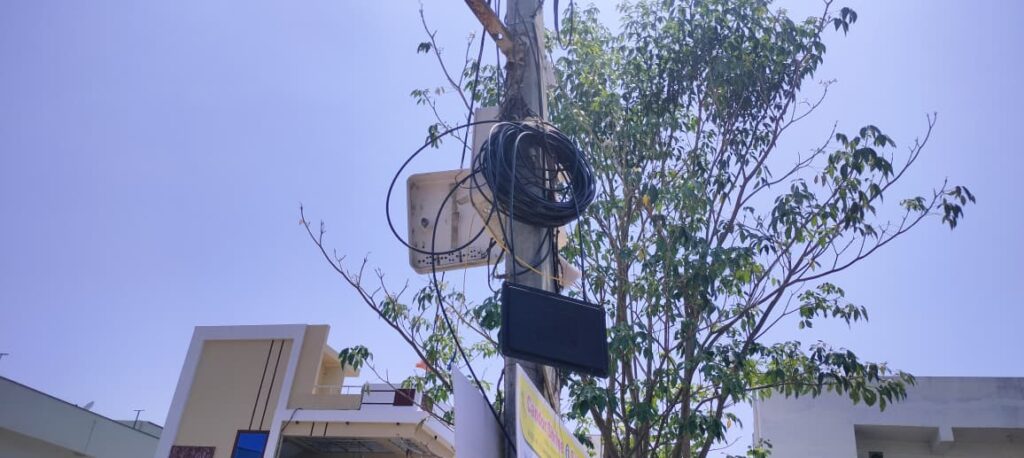
Your internet depends entirely on the DP (Distribution Point) box—those small black or white plastic boxes on the electricity poles.
The Port Problem: A DP box has a limited number of “ports” (slots). If your neighbors have already taken all the slots, it doesn’t matter if the provider “serves your area”—there is literally no place to plug in your wire.
📋 Step-by-Step: The Correct Way to Verify
Step 1: Gather Your “Exact” Details
General area names are useless. To get an accurate feasibility report, have this ready:
Exact House/Flat Number
Apartment/Building Name
Street Name & Landmark (e.g., “Near Metro Pillar 120”)
Pincode
Step 2: The Digital Check (Preliminary)
Check the official sites of Airtel, Jio, and ACT.
Warning: A website “Yes” is just an invitation. Treat it as a “Maybe” until a human sees your pole.
Step 3: The “Society Secret” (Crucial for Apartments)
If you live in a gated community in Kondapur, Manikonda, or Gachibowli, the website is almost irrelevant.
RWA Monopolies: Many Resident Welfare Associations (RWAs) have exclusive deals with one specific ISP. Even if Jio is available in the colony, your society office might not allow them to lay cables in your specific block.
Pro Tip: Ask your security guard or society manager: “Which broadband providers are actually allowed to work in this building?” This saves you a week of frustration.
Step 4: The Physical Feasibility Visit
The technician is the only person who can give you a “Yes.” They will:
Locate the nearest DP box.
Verify if there is an empty port.
Calculate the cable length (too long = signal drop).
Ensure the cable route doesn’t violate society rules.
Expert Advice: Do not pay the full installation fee until the technician confirms the “Last Mile” is clear.
🚩 Red Flags: When to Give Up on a Provider
If you notice any of these, the connection will likely be unstable, regardless of what the salesman says:
The “Cable Jungle”: If the poles outside your house look like a messy web of tangled wires, expect frequent “fiber cuts” during rain or wind.
The “Too Far” Box: If the technician says the DP box is 200+ meters away, your speed will likely be lower than advertised.
The “Wait and See” Promise: If the technician says, “The box is full, but we will add a new one in two weeks,” they are usually lying. Find another provider.
✅ Final Summary Checklist
📚 Need More Help?
Now that you know if it’s available, figure out which one to pick:
Final Thought: Availability is the first hurdle, but stability is the real goal. Don’t just pick the first provider who says “Yes”—pick the one your neighbors actually trust.
Disclaimer: This guide is for informational purposes. hydbroadband.in does not sell plans or represent any ISP. Availability and installation are determined solely by the provider’s local infrastructure.