
Internet Slow or Dropping? How to Actually Fix Your Wi-Fi in Hyderabad (2026)
Last Updated: June 2026
We’ve all been there. You’re in the middle of a high-stakes Zoom call or a final round of a game, and suddenly—freeze. Your screen pixels, your audio cuts out, and you’re left staring at a loading circle.
You call your ISP, and they tell you, “Sir, your plan is 200 Mbps, everything is fine from our end.”
But it’s not fine. You’re paying for a Ferrari of a connection, but it feels like a cycle rickshaw. In my time analyzing home networks across Hyderabad, I’ve realized that the problem is almost never the “plan.” The problem is usually a combination of Hyderabad’s thick concrete walls, poor router placement, and the occasional “Metro-cut” cable.
If you’re tired of restarting your router every two hours, this guide is for you. No corporate jargon—just real fixes.

🛑 The “Symptom Checker”: What’s Actually Wrong?
Before you waste an hour on a customer care call, check this list. Most of your problems fall into these three buckets:
“It’s fast in the hall, but dead in the bedroom”
→You have a Wall Problem. Your Wi-Fi signal is fighting reinforced concrete.“It works great all day, but dies at 9 PM”
→You have a Congestion Problem. Everyone in your apartment complex is streaming Netflix at the same time.“The whole colony is offline”
→You have a Fiber Cut. Some construction crew nearby probably dug up the wrong cable.“My video is freezing, but the speed test says it’s fast”
→You have a Latency/Ping Problem. Your “speed” is fine, but your “stability” is trash.
🏗️ Why Hyderabad Homes are a “Wi-Fi Nightmare”
If you live in a flat in Gachibowli, Madhapur, or Kondapur, you’re likely living in a concrete box. Most of our buildings use reinforced concrete (RCC), which is basically a shield for Wi-Fi signals.
The “TV Unit” Trap: I see this in almost every home I visit. People put their expensive router inside a wooden TV cabinet or hide it behind a sofa to make the room look “clean.” Stop doing this. Putting a router in a cupboard is like putting a blanket over your internet. You are killing your signal before it even leaves the box.
The “Doorway” Problem: Most technicians install the router right where the wire enters the house—usually near the main door. This means half of your signal is being broadcasted into the hallway or the street, instead of into your bedrooms.
✅ 5 Real Fixes (That Actually Work)
1. The “60-Second” Refresh
Your router is a small computer. It gets “clogged” with temporary data. I recommend a weekly reboot. Turn it off, wait a full minute, and turn it back on. It sounds simple, but it fixes about 40% of “random” slowdowns.
2. Kill the 2.4 GHz Band
If you see two Wi-Fi names (e.g., Home_WiFi and Home_WiFi_5G), always use the 5G one for your laptop or TV.
In dense areas like Kukatpally or Ameerpet, the 2.4 GHz band is “jammed” because every single neighbor’s router is fighting for the same space. 5 GHz is a cleaner, faster lane.
3. The “Wire” Truth (Ethernet is King)
If you are a gamer or a WFH professional, stop relying on Wi-Fi. I don’t care how expensive your router is; it will never beat a physical cable. Buy a Cat6 Ethernet cable and plug your laptop directly into the router. Your “ping” will drop, and the freezing will stop instantly.
4. Solve the “Dead Zone” with Mesh
If you live in a large 3BHK or a duplex in Manikonda or Jubilee Hills, one router is not enough. Don’t buy those cheap “Wi-Fi Extenders”—they usually just cut your speed in half. Invest in a Mesh System (like TP-Link Deco). It creates a “blanket” of internet that actually travels through those concrete walls.
5. Stop the Power Flickers
Hyderabad’s power dips can “glitch” your router. Even a one-second flicker can cause your modem to lose its “handshake” with the ISP. Get a cheap Router UPS. It keeps the internet alive during a power cut and protects your hardware from voltage spikes.
How to Improve Wi-Fi Speed at Home in Hyderabad — A comprehensive guide to improving wireless performance inside your home through better router placement, band selection, and network management.
🚩 When to Stop Fixing and Just Switch Providers
Sometimes, the problem is the ISP. You should start looking for a new provider if:
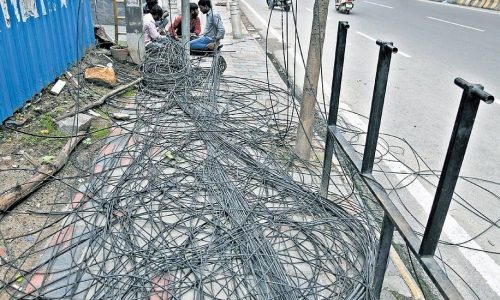
The “Cable Jungle”: You look outside and see a mess of tangled wires on the pole. This is a sign of poor maintenance and frequent “fiber cuts.”
The “Lying” Speed Test: You use a LAN cable, but you’re still getting 50 Mbps on a 200 Mbps plan.
The Ghost Support: You’ve raised three tickets and the technician says “I’m coming” but never shows up.
❓ FAQs
Q: Why is my internet slow even though I pay for a high-speed plan?
A: Because “Plan Speed” and “Wi-Fi Speed” are two different things. Your plan brings 200 Mbps to the router, but your walls might only let 20 Mbps reach your phone. Test with a cable to find the truth.
Q: Should I upgrade my plan to fix the lag?
A: Probably not. If your 100 Mbps plan is lagging, a 300 Mbps plan will likely lag too. The problem is usually the router placement or the signal interference, not the bandwidth.
Q: Is AirFiber actually a good replacement for Fiber?
A: Only if you have no other choice. Fiber is physical; it’s stable. AirFiber is wireless; it can be affected by heavy rain or a new building popping up in the line of sight.
Airtel vs JioFiber vs ACT – Detailed Comparison — The most comprehensive side-by-side comparison of the three dominant fiber providers in Hyderabad. Covers speed, pricing, customer service, and which provider suits which type of user.
Final Word: Stop Blaming the ISP
Most of the time, we call the ISP and shout at them, but the problem is our own setup. Move your router, switch to 5 GHz, and use a cable for your work laptop. Do these three things, and you’ll probably realize your “slow” internet was actually just “poorly placed” internet.
Disclaimer: I’m not a corporate spokesperson for any ISP. This is based on real-world testing in Hyderabad homes. Your results will depend on your building’s construction and your specific provider.