Last Updated: Sep 2026
Finding a reliable broadband connection in Yakutpura is rarely as simple as clicking “Apply” on a website. For residents of PIN code 500023, the “digital divide” isn’t about speed—it’s about feasibility.
Yakutpura is a densely populated heart of the Old City, characterized by a mix of ancestral homes, narrow gallis (lanes), and emerging apartment clusters. While the major ISPs claim to cover the area, the reality is that two houses on the same street can have completely different options based on where the nearest fiber junction box (DP) is located.
If you are looking for a connection that doesn’t drop during peak evening hours or fails during the monsoon, you need to look beyond the advertisements. This guide provides the ground reality of internet connectivity in Yakutpura.
The Infrastructure Reality: “Main Road vs. Interior Lanes”
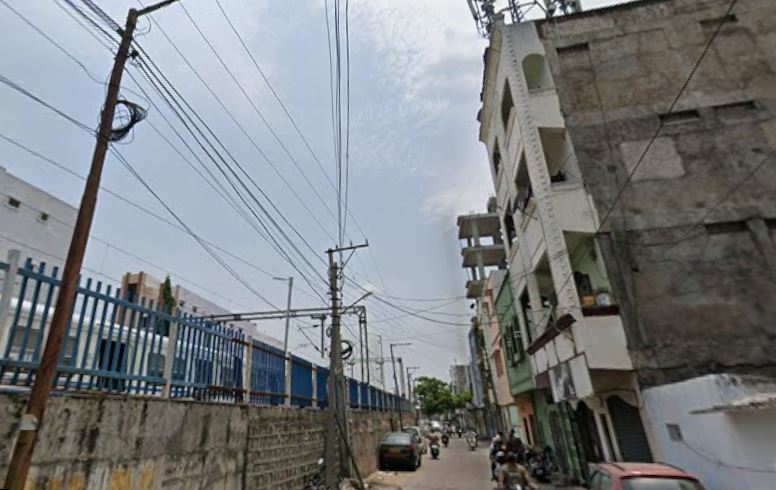
In Yakutpura, your internet experience is decided by your distance from the main road. Because the area developed organically over decades, the fiber rollout has been uneven.
High-Availability Zones (The “Easy” Installations)
If you live near the Yakutpura Railway Station, the roads connecting to Malakpet, or the Dabirpura corridor, you are in a high-availability zone.
Infrastructure: Fiber poles are frequent, and most major ISPs (Airtel, Jio, ACT) have active presence.
Installation: Usually fast (2–4 days) as the “last-mile” cable distance is short.
The Interior Lane Challenge (The “Difficult” Installations)
In the deeper residential pockets and narrow lanes, the story changes.
The “Port” Problem: An ISP may say they serve Yakutpura, but if the local junction box on your lane is full, they cannot give you a connection until a new box is installed.
Routing Issues: In very narrow lanes, technicians sometimes struggle to route cables without them being damaged by vehicles or weather.
Feasibility Checks: In these areas, a “feasibility visit” is mandatory. Do not pay any installation fees until the technician confirms they can actually reach your house
Areas Near Main Roads Usually Get Better Connectivity
Fiber installation is typically easier around:
- Yakutpura Railway Station side
- Malakpet connecting roads
- Dabirpura side roads
- wider internal roads
- apartment clusters with existing wiring
In these locations, providers like Airtel Xstream Fiber, JioFiber, ACT Fibernet, and local operators usually already have nearby infrastructure.
Installation also tends to be faster because technicians do not need additional cable approvals or complicated routing work.
Inner Lanes Can Still Be Difficult in Some Places
Some smaller lanes inside older residential pockets may still face:
- limited fiber access
- feasibility checks
- installation delays
- fewer ISP choices
This is common across many Old City areas where buildings were constructed long before fiber broadband became standard.
In some cases, the provider may initially accept the booking online but later cancel after a technician visit if cable routing is difficult.
That is why checking with nearby residents before applying is genuinely useful here.
Which Broadband Providers Work Best in Yakutpura?
Broadband quality in Hyderabad often depends more on local implementation than the company name itself. One provider may work brilliantly on one street and poorly just a few lanes away.
Still, these are the most commonly used providers in Yakutpura during 2026.
Local ISP vs Airtel vs JioFiber vs ACT in Hyderabad (2026)
Comparing Broadband Providers in Yakutpura
In an area like Yakutpura, the “best” provider is simply the one that has a stable port on your street. However, here is how the top players generally perform in this locality.
ISP Performance Comparison Table
| Provider | Best For… | Reliability | Local Presence | Key Advantage |
| Airtel Xstream | WFH & Stability | Very High | Strong | Best uptime for professional video calls. |
| JioFiber | OTT & Budget | High | Very Strong | Best bundled plans (Netflix/Prime/Disney+). |
| ACT Fibernet | Gaming & Downloads | High | Moderate | Lowest latency (Ping) for online gaming. |
| BSNL Fiber | Hard-to-reach lanes | Moderate | Universal | Available where private ISPs often fail. |
| Local ISPs | Quick Fix / Budget | Variable | Hyper-Local | Faster “on-call” support for local repairs. |
Local Broadband Providers in Yakutpura
Apart from major brands, several smaller local internet operators also serve Yakutpura and nearby Old City areas.
Some commonly seen names include:
- Aelia Internet
- Sravan Internet Broadband
- SL Fiber Link
- area-based cable fiber operators
Interestingly, local providers sometimes perform surprisingly well because they understand local cable routes and building layouts much better than large companies.
In some lanes, local operators also provide:
- faster installation
- easier cable approvals
- quicker technician response
- better support for difficult buildings
At the same time, quality can vary heavily between operators, so nearby user feedback matters a lot.
What Internet Speed Is Actually Enough?
A lot of households end up buying plans they never fully use.
For most Yakutpura homes, these are more realistic speed requirements:
| Usage Type | Recommended Speed |
|---|---|
| Browsing & YouTube | 30–50 Mbps |
| Online classes | 50 Mbps |
| Work from home | 100 Mbps |
| OTT streaming + multiple users | 100–150 Mbps |
| Gaming + heavy downloads | 200 Mbps+ |
For Most Families, 100 Mbps Is More Than Enough
For normal family usage, a stable 100 Mbps fiber connection comfortably handles:
- multiple smartphones
- smart TV streaming
- Zoom meetings
- online classes
- social media
- everyday browsing
Beyond that point, home WiFi quality usually matters more than raw internet speed.
A lot of people upgrade to expensive plans expecting miracles, but the real issue inside many homes is poor router placement or overloaded WiFi.
How to Choose the Right Broadband Plan for Your Home
Solving Common “Old City” Internet Problems
The architecture of homes in Yakutpura often creates internet problems that people mistakenly blame on the ISP.
1. The “Concrete Fortress” Effect
Many houses in Yakutpura have thick stone or reinforced concrete walls. These materials are “WiFi killers,” blocking the signal from reaching the upstairs or back rooms.
The Fix: Place your router in the central-most room and keep it elevated. If you have a multi-story house, consider a WiFi Extender or a Mesh System.
2. The “Evening Slowdown”
Because Yakutpura is so densely populated, hundreds of routers are operating in a small area. This leads to “Wireless Interference” between 8 PM and 11 PM.
The Fix: Switch to the 5 GHz band on your dual-band router. It is faster and much less crowded than the 2.4 GHz band.
3. The Overhead Cable Risk
In independent houses, fiber cables are often strung overhead. In Yakutpura, these are prone to being snapped during roadwork or by heavy monsoon winds.
The Fix: If you experience frequent “Red Lights” (LOS) on your router, ask your technician to secure the cable with better clips or suggest a more protected route.
Internet Speed Guide (Mbps Explained Simply)
Keep the Router in an Open Area
Avoid placing routers:
- inside shelves
- behind televisions
- near kitchen appliances
- in closed cupboards
Open placement improves coverage much more than most people expect.
Use 5 GHz WiFi if Your Router Supports It
Modern dual-band routers support:
- 2.4 GHz
- 5 GHz
Inside apartment buildings, 5 GHz usually performs better because it faces less interference from nearby networks.
Streaming and large downloads generally feel much smoother on 5 GHz connections.
Use Ethernet for Gaming
For gaming, Ethernet matters more than upgrading from 100 Mbps to 300 Mbps.
A wired connection usually improves:
- ping stability
- latency consistency
- packet loss
- lag spikes
That is why serious gamers still prefer Ethernet over WiFi whenever possible.
Common Broadband Problems in Hyderabad & Fixes
Apartments vs Independent Houses in Yakutpura
Apartment buildings usually get faster installations because providers already have existing wiring inside the building.
In many apartments:
- multiple ISPs already operate
- shared fiber lines exist
- technician access is easier
Installation often finishes within 2–3 days.
Independent houses can sometimes take longer because:
- new cable routing may be required
- feasibility checks happen first
- additional wiring work may be needed
In some cases, installation timelines depend entirely on nearby pole access and local cable routing permissions.
A Simple Tip Before Choosing Any Broadband Provider
Online reviews only tell part of the story.
Before applying for a new connection, ask nearby residents:
- which ISP they are using
- whether speeds drop at night
- how quickly technicians respond
- whether outages are frequent
In Yakutpura, street-level feedback is often more accurate than advertisements or app ratings.
Frequently Asked Questions (FAQ)
Q: Which is the best ISP for students in Yakutpura?
A: Airtel and ACT are generally preferred for students due to their stability for online classes and faster download speeds for educational content.
Q: Why is my JioFiber installation pending in Yakutpura?
A: This is usually due to “Port Exhaustion.” If the local distribution box on your street is full, Jio must install a new box before they can activate your line.
Q: Are local cable operators better than big brands?
A: In the deep lanes of Yakutpura, local operators are often better because they know the shortcuts for cable routing and can send a technician to your house within hours.
Q: How can I check if fiber is available at my exact address?
A: The most reliable way is to ask your immediate neighbor. If they have a working fiber connection from a specific provider, that provider is the most likely to be able to install a connection for you quickly.
Final Verdict for Yakutpura Residents
For the best experience in Yakutpura (500023), follow this priority list:
For Professional Stability:
→Airtel Xstream Fiber.For Home Entertainment/Value:
→JioFiber.For Gaming/High Performance:
→ACT Fibernet.For Remote Interior Lanes:
→BSNL or Local ISPs.
Disclaimer: This article is for informational purposes only. Broadband availability, pricing, installation timelines, and performance vary depending on street-level infrastructure, provider feasibility, building access, local routing, and network congestion in your exact area.