
The Best Router for Hyderabad Homes (2026): Stop the Buffering & Kill the Dead Zones
Last Updated: June 2026
Here is a scenario that plays out in thousands of Hyderabad homes every day: You pay for a high-speed 300 Mbps or 500 Mbps plan from Airtel, JioFiber, or ACT. You’re excited about the speed. But then you move into your bedroom, and suddenly your phone drops to one bar. Your Zoom call freezes, your 4K movie buffers, and your gaming ping spikes.
You call your ISP, and they tell you, “Sir, the signal is reaching your house perfectly.”
They aren’t lying. The signal is reaching your router, but it isn’t reaching you.
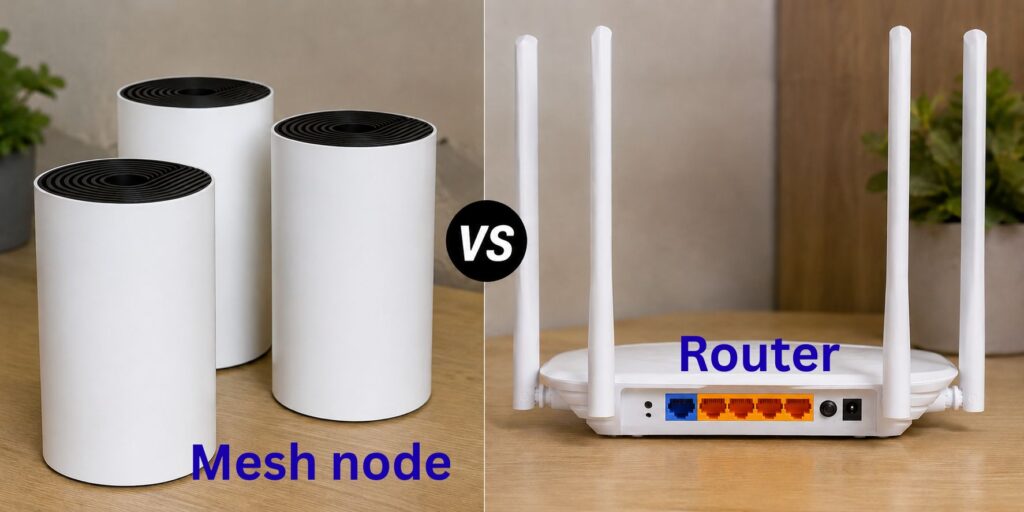
In a city like Hyderabad, where reinforced concrete walls are the standard for almost every apartment from Gachibowli to Uppal, the router is the most important piece of hardware in your home. If you are using the “Free Router” provided by your ISP, you are likely fighting a losing battle against your own walls. This guide will help you pick the right hardware to actually feel the speeds you are paying for.
👉 Upload speeds, and VPN performance. check out our [Best internet for work from home guide]
🚫 The “Free Router” Trap: Why Your ISP’s Gear Isn’t Enough
Almost every broadband provider in Hyderabad gives you a “Free” ONT/Router. While these are functional, they are designed for basic use, not for the complex layouts of Hyderabad homes.
The Problem with Free Routers:
Weak Antennas: They struggle to push signals through a single RCC (Reinforced Concrete) wall.
CPU Overload: When you connect 10+ devices (phones, laptops, Smart TVs, Alexa), the cheap processor inside the free router overloads, causing random “micro-drops.”
Congested Bands: They often struggle to manage the 2.4 GHz and 5 GHz bands efficiently in crowded apartment complexes in Kukatpally or Kondapur, where 50 other routers are fighting for the same airwaves.
The Solution: You don’t necessarily need a new plan; you need a better faucet. By adding a high-quality third-party router, you can often double your perceived speed without paying a rupee more to your ISP.
🧱 The “Hyderabad Factor”: Why Your Home is a Wi-Fi Nightmare
Before buying a router, you must understand the “enemy.” Wi-Fi signals are radio waves, and in Hyderabad, they face three massive obstacles:
1. The RCC Shield (Reinforced Concrete)
Unlike homes in the West built with drywall, Hyderabad homes are built with thick concrete and steel. A single structural column can block 50% of your Wi-Fi signal. If your router is in the living room and your office is two rooms away, your signal is fighting a war it cannot win.
2. High-Density Interference
If you live in a gated community in Madhapur or Manikonda, your air is filled with Wi-Fi signals. When 100 routers in one building all broadcast on the same channel, it creates “Signal Noise.” This is why your speed might be great at 3 AM but terrible at 9 PM.
3. The “Doorway” Layout
Many Hyderabad 2BHKs and 3BHKs have a “linear” design where the fiber entry point is near the main door. This means the router is placed in a corner, broadcasting half the signal into the hallway and only half into the home.
🎯 How to Choose Your Router (The “Home-Type” Strategy)
Don’t buy a router based on the box’s “AC” or “AX” numbers. Buy it based on your home layout.
Scenario A: The Compact Flat (1BHK / Small 2BHK)
If your home is under 1,000 sq. ft. and you have a central open space.
What you need: A single, powerful Wi-Fi 6 (AX) Router.
Why: Wi-Fi 6 is designed to handle many devices and reduces the “interference” from your neighbors.
Top Pick: TP-Link Archer AX55 or ASUS RT-AX53U.
Scenario B: The Large Family Apartment (3BHK / 4BHK)
If your home is over 1,500 sq. ft. and has multiple rooms with thick walls.
What you need: A Mesh Wi-Fi System.
Why: A single router cannot push a signal through three concrete walls. A Mesh system uses “nodes” (satellite routers) that you place in different rooms. They talk to each other, creating one single, seamless blanket of Wi-Fi across the whole flat.
Top Pick: TP-Link Deco M4 or Tenda Nova.
Scenario C: The Independent House / Villa (Multi-Floor)
If you live in a multi-floor house in Miyapur, Kompally, or Jubilee Hills.
What you need: A Tri-Band Mesh System with wired backhaul.
Why: Concrete floors are even thicker than walls. You need a node on every floor. If possible, connect the nodes using a physical LAN cable (Wired Backhaul) to ensure the second floor gets the same speed as the first.
Top Pick: Netgear Orbi or ASUS ZenWiFi.
👉 Check out our [Common Internet Problems in Hyderabad] guide or learn [How to Position Your Router] for maximum coverage.
🚀 Pro Tip: The “Bridge Mode” Secret (For Advanced Users)
If you buy a high-end router, don’t just plug it into the ISP router and leave it. This creates a “Double NAT” problem, which can cause lag in gaming and issues with VPNs.
The Fix: Bridge Mode
Go into your ISP router’s settings and enable “Bridge Mode.” This turns off the routing function of the ISP box and makes it a simple “pass-through.” Now, your new, powerful router handles all the traffic. This is the only way to get 100% of the performance you paid for.
💰 Matching Your Router to Your Plan
Buying a ₹15,000 router for a 40 Mbps plan is a waste. Matching your hardware to your speed is the smartest way to spend.
| Your Plan Speed | Recommended Hardware | Why? |
| Up to 100 Mbps | Dual-Band Wi-Fi 5 Router | Sufficient for basic streaming and browsing. |
| 100 – 300 Mbps | Wi-Fi 6 (AX) Router | Handles multiple devices and reduces lag. |
| 300 Mbps – 1 Gbps | High-End Wi-Fi 6 or Tri-Band Mesh | Prevents the router from becoming a bottleneck. |
| Any Speed (Large Home) | Mesh Wi-Fi System | Essential to kill “Dead Zones” in concrete homes. |
🚩 3 Common Mistakes Hyderabad Users Make
The “Cabinet Trap”: Putting the router inside a wooden TV unit or a cupboard. This is like putting a muffler on your internet. Get it out in the open.
The “Floor” Mistake: Placing the router on the floor or a low table. Wi-Fi signals radiate downwards and outwards. Mount it 5-6 feet high on a wall or shelf.
Ignoring the 5 GHz Band: Many users stay on 2.4 GHz because it has “more bars.” In crowded apartments, 2.4 GHz is a warzone. Switch to 5 GHz for an immediate speed jump.
❓ Frequently Asked Questions
Q: Will a new router actually increase my internet speed?
A: It won’t increase the speed coming from the ISP, but it will increase the speed reaching your device. If your ISP gives you 300 Mbps but your old router only pushes 50 Mbps to your bedroom, a new router will “unlock” that missing speed.
Q: Do I really need a Mesh system for a 3BHK?
A: In Hyderabad, yes. Because of the reinforced concrete, a single router almost always leaves “dead zones” in the farthest bedrooms. A Mesh system is the only way to get a consistent signal in every room.
Q: Is Wi-Fi 6 worth the extra money?
A: Yes, especially if you have more than 10 devices (phones, tablets, smart bulbs, TVs). Wi-Fi 6 (AX) manages multiple devices much more efficiently than Wi-Fi 5 (AC), reducing the “buffering” when everyone is online.
Final Verdict: The Hardware Priority List
If you are experiencing slow internet, follow this order of operations:
Move the router to a central, elevated position (Free).
Switch to the 5 GHz band (Free).
Use a LAN cable for your work laptop/gaming console (Cheap).
Buy a Wi-Fi 6 Router for small/medium homes (Investment).
Install a Mesh System for large/multi-floor homes (Investment).
Disclaimer: Router performance depends on home layout, device compatibility, and ISP stability. We recommend checking if your devices support Wi-Fi 6 before purchasing a high-end router.