Last Updated: Sep 2026
Nagole (PIN code 500068) has undergone a massive transformation. Once considered the outskirts of East Hyderabad, the arrival of the Metro and the expansion of the Alkapuri Township have turned it into a high-demand residential and commercial hub. Today, Nagole serves as a vital link between Uppal, LB Nagar, and ECIL.
With this rapid growth comes a surge in digital demand. From freelancers working in home offices to families streaming 4K content and students preparing for exams, the need for high-speed, low-latency internet is at an all-time high. However, because Nagole is a mix of planned townships and older, unplanned residential lanes, the “broadband reality” varies from one street to another.
This guide breaks down the actual state of internet connectivity in Nagole to help you choose a provider that offers stability, not just promises.
The Broadband Infrastructure of Nagole (500068)
Internet connectivity in Nagole is divided into two distinct “zones.” Understanding which zone you fall into will determine which ISP you should choose.
Zone A: The Metro & Commercial Belt (High Availability)
Areas surrounding the Nagole Metro Station, main roads leading to Uppal, and the commercial stretches of the locality have the densest fiber penetration.
Infrastructure: Most providers have high-capacity Distribution Points (DPs) here.
Experience: Installation is usually fast, and you have the luxury of choosing between Airtel, Jio, and ACT.
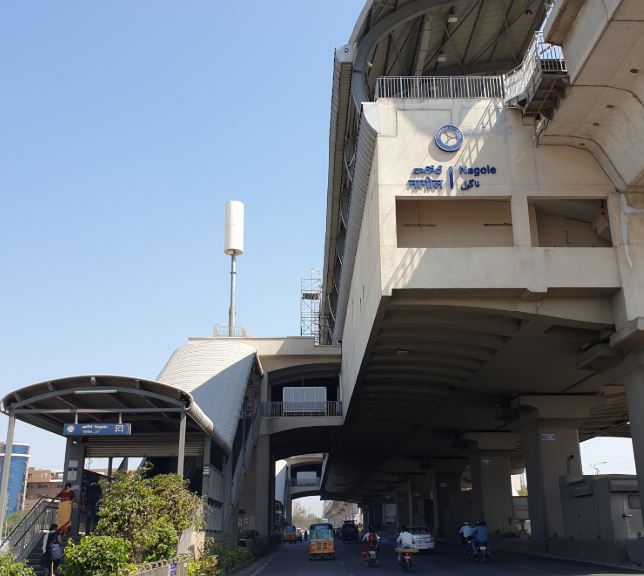
Zone B: Alkapuri Township & Interior Colonies (Variable Availability)
In areas like Alkapuri Township and the quieter residential lanes, the experience is different.
Infrastructure: While fiber is available, “port availability” is a common issue. You might find that a provider is “available in Nagole,” but their local box on your street is full.
Experience: You may have to rely more on local ISPs or BSNL if the “Big Three” have no free ports in your specific lane.
Top Broadband Providers in Nagole: A Detailed Comparison
Not every provider is suited for every user. In Nagole, the choice usually comes down to your primary use case.
ISP Comparison Table
| Provider | Best For… | Reliability | Installation Speed | Local Performance Note |
| Airtel Xstream | Remote Work / WFH | Very High | Moderate | Best for stable Zoom/Teams calls in Nagole. |
| JioFiber | Home Entertainment | High | Very Fast | Best for OTT bundles and smart home setups. |
| ACT Fibernet | Gaming & Uploads | High | Moderate | Lowest latency for gamers in East Hyderabad. |
| BSNL Fiber | Interior Pockets | Moderate | Slow | Most reliable reach in older Nagole lanes. |
| Local ISPs | Budget / Quick Setup | Variable | Very Fast | Good for those who need a local technician. |
Speed Recommendations for Nagole Households
Avoid the trap of buying the most expensive plan. Most users in Nagole find a “sweet spot” between 100 Mbps and 150 Mbps.
Speed vs. Usage Table
| User Profile | Suggested Speed | Ideal Usage | Device Count |
| The Casual User | 40 – 80 Mbps | Browsing, YouTube, WhatsApp | 1–3 Devices |
| The Student | 80 – 100 Mbps | Online Classes, Research, HD Streaming | 2–4 Devices |
| The WFH Professional | 100 – 200 Mbps | VPNs, Video Conferencing, Large File Transfers | 3–6 Devices |
| The Power Family | 200 – 300 Mbps | Multiple 4K TVs, Pro Gaming, Smart Home | 6+ Devices |
Solving the “Slow Internet” Mystery in Nagole Homes
Many residents complain that their 100 Mbps plan feels like 20 Mbps. In Nagole’s residential layouts, the problem is rarely the ISP—it is usually the Internal WiFi environment.
1. The “Wall Obstacle”
Many homes in Nagole are built with thick reinforced concrete. WiFi signals struggle to pass through two or more walls.
The Solution: Place your router in the center of the house, preferably on a high shelf. Never place it inside a cupboard or behind a TV.
2. Peak-Hour Congestion
Between 8:00 PM and 11:00 PM, network traffic in Nagole spikes as everyone returns from work and starts streaming.
The Solution: Use the 5 GHz band on your router for your most important device. While 2.4 GHz travels further, 5 GHz is much faster and less prone to interference from neighbors’ WiFi.
3. The Ethernet Advantage
For those who trade stocks, game online, or attend critical board meetings, WiFi is not enough.
The Solution: Buy a Cat6 Ethernet cable and plug your laptop directly into the router. This eliminates “lag spikes” and gives you 100% of the speed you pay for.
Installation Reality: Apartments vs. Independent Houses
Depending on your property type in Nagole, the installation process differs:
In Apartments: Since most complexes near the Metro already have “riser cables” (internal wiring), installation is usually a 24-to-48 hour process. You often have multiple ISP options.
In Independent Houses: Technicians must run a cable from the nearest pole. If your house is deep in a colony, this may require “cable routing” and can take 3–5 days. Always check if the provider has a “free port” on your street before paying.
👉 Availability check guide: How to Check Broadband Availability in Hyderabad — Step-by-Step
💡 Local Tip That Saves You Time
Before applying:
👉 Ask people in your building or street:
- Which provider they use
- Whether speeds drop in evenings
- How fast installation was
In areas like Nagole, neighbor feedback is more reliable than online reviews
👉 Is 100 Mbps Enough for Work From Home in Hyderabad?
Frequently Asked Questions — Broadband in Nagole (500068)
Q. Is fiber broadband available in all parts of Nagole?
Fiber broadband is available in many parts of Nagole, especially near the Metro station, Alkapuri Township, and main roads. However, coverage can vary in interior lanes and older residential streets.
👉 It’s always best to check availability using your exact address, not just the pin code.
Q. Which broadband provider is best in Nagole?
There is no single “best” provider for the entire area.
- Airtel Fiber → Reliable for work-from-home and stable speeds
- ACT FiberNet → Good for high-speed usage and gaming
- JioFiber → Budget-friendly with OTT bundles
👉 The best provider is the one that is properly installed and working in your building
Q. Are there local internet providers in Nagole?
Yes, along with major brands, some local broadband providers operate in parts of Nagole and nearby areas like Kothapet.
Commonly mentioned local ISPs include:
- CM Communications – Known in Kothapet / New Nagole areas
- S R Communications – Serves parts of Nagole and surrounding colonies
- Excell Broadband – Available in select residential pockets
- Sravan Internet Broadband – Used in some local neighborhoods
👉 These providers are usually found in:
- Interior residential lanes
- Independent house areas
- Streets where large ISPs have limited reach
Q. Should I choose a local ISP or a major provider?
It depends on your situation:
👉 Choose major providers (Airtel / ACT / JioFiber) if:
- They are available in your building
- You want stable speeds and long-term reliability
👉 Consider a local ISP if:
- Fiber is not available in your street
- You need quick installation
- You want a lower-cost option
👉 Always check real user feedback from your neighbors before deciding
Q. Is broadband installation difficult in Nagole?
In most apartments, installation is straightforward and takes 2–5 working days.
In independent houses or interior lanes:
- Installation may take longer
- Providers may do a feasibility check
- Cable routing may be required
Q. What speed is enough for a home in Nagole?
For most households:
- 80–100 Mbps → Basic use, online classes
- 100–150 Mbps → Work-from-home + streaming
- 150–200 Mbps → Multiple users
👉 In most cases, 100 Mbps is enough if your Wi-Fi setup is proper
Q. Why is my internet slow even with a high-speed plan?
This is very common and usually not a provider issue.
Main reasons:
- Router placed in a corner
- Thick walls blocking signal
- Too many devices on one network
👉 Fixing router placement or using 5 GHz Wi-Fi often solves the problem instantly
Q. How can I check which broadband works best in my area?
The most reliable method:
👉 Ask people in your building or street
You’ll get:
- Real speed experience
- Downtime information
- Installation feedback
👉 In areas like Nagole, local feedback is more accurate than online reviews
Final Thoughts — What Actually Matters in Nagole
Nagole is still a developing broadband zone, not fully saturated like central Hyderabad areas.
That means:
✔ Good options exist — but not everywhere equally
✔ Availability matters more than brand
✔ Correct plan + proper Wi-Fi setup = best experience
👉 If you check properly and choose based on your building, you can get a fast and stable connection without overpaying
👉 How Broadband Installation Works in Hyderabad — Complete Step-by-Step
Quick Checklist Before You Apply
Use this before finalizing your connection:
✔ Provider available at your exact address
✔ Building allows installation
✔ Plan matches your real usage
✔ Router placement planned
👉 This simple check avoids 90% of common broadband problems
If you are looking for broadband information in localities near Nagole:
Disclaimer: hydbroadband.in is an independent informational guide. We are not affiliated with any ISP and do not sell plans. Always verify current pricing and availability directly with the provider for your specific house number.
Looking for broadband connections in other areas of Hyderabad? Visit our Home page.